ZaatarLABS Get in touch →
THE SMART COACH · THE SMART COACH · THE SMART COACH
All apps

Coaching iPhone · iPad · Mac
The Smart Coach

The Smart
Coach.

Know where you left off with every client, and who still owes you. Each client's last session notes, #themes and unbilled sessions on one screen. Tick the sessions, create the bill, record the payment, in full or in part. No account, no client logins; your records sync through your own iCloud.

Free for up to 2 clients
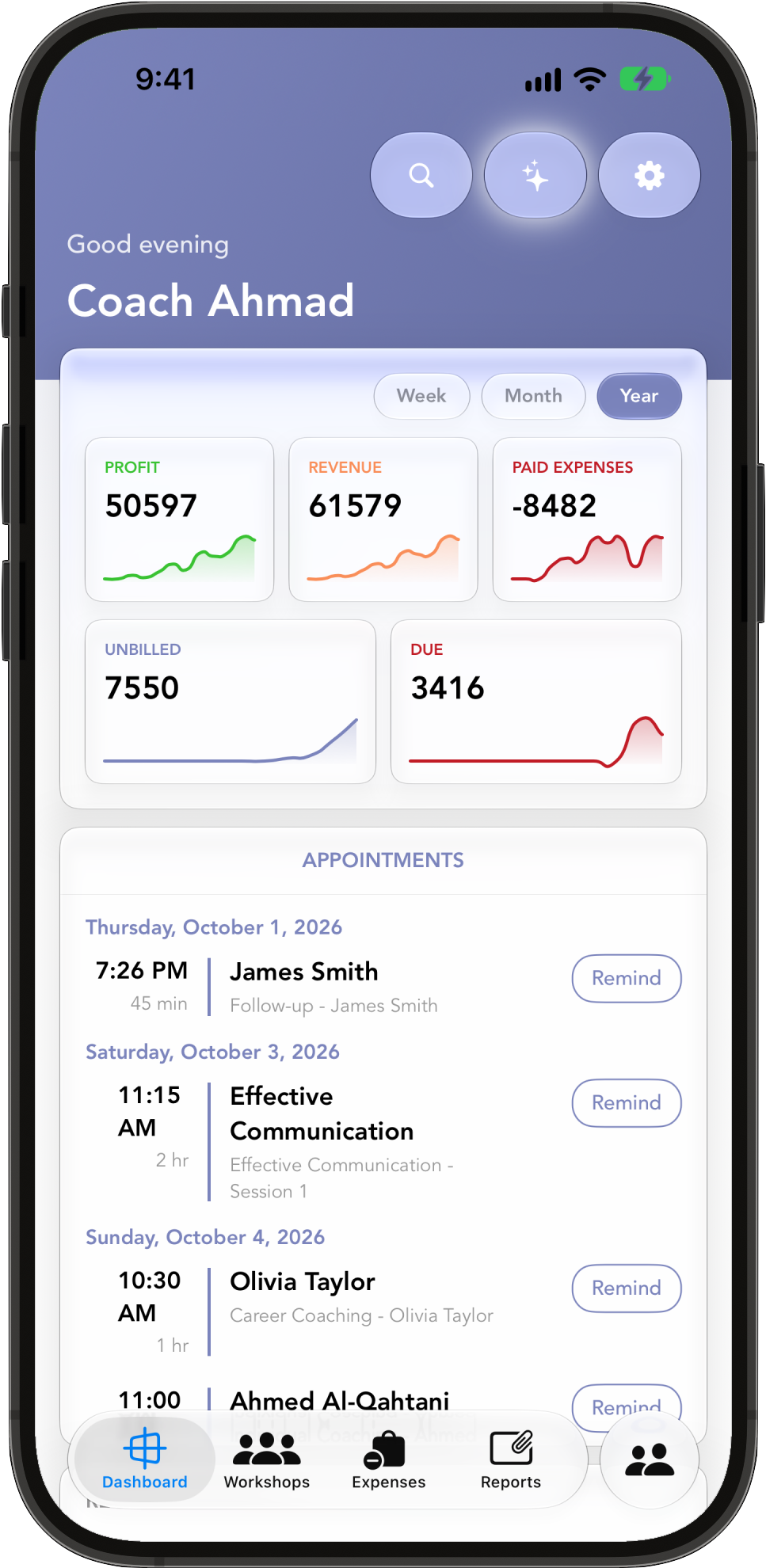
Smart Coach on iPad: the dashboard with the year's profit, revenue, unbilled and due, and the coming appointments with Remind buttons A client in Smart Coach on iPhone: the upcoming appointment, 4 unbilled sessions and the last session's notes with #career and #leadership themes
Walk in knowing where you left off. Walk out knowing what you're owed.   —   For solo coaches, on iPhone, iPad and Mac.
How it works

Before the session.
After it, the bill.

Your notes, your sessions and your money for every client, in one app you already carry. No platform to set up and nothing for your clients to log in to.

01 — Before the session

Where you left off

Open the client: the last session's notes and #themes, the next appointment, sessions you haven't billed yet, and a timeline of every session. #themes highlight as you type, and search finds them across all your sessions. Export one session, or all of them, as a PDF. Coaching session notes

02 — After the session

Tick, total, bill

Tick the unbilled sessions, watch the total, tap Create Bill. The invoice is numbered for you, takes a discount, a due date and your VAT rate and number, and comes out as a PDF with your logo, ready to share to WhatsApp or Mail. Invoicing coaching sessions

03 — Who owes you

Paid, partly paid, due

Every client shows what's unbilled, billed and due, and the client list filters to Unbilled or Due. Record payments in full or in part, with a PDF receipt each time; take an advance and it comes off the next bill. With Overdue Payment Alerts on, the app reminds you every Monday.

04 — Client Brief

Read it before they arrive

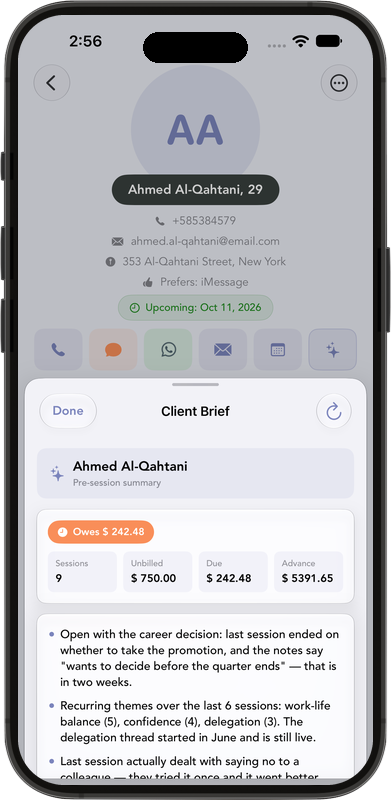
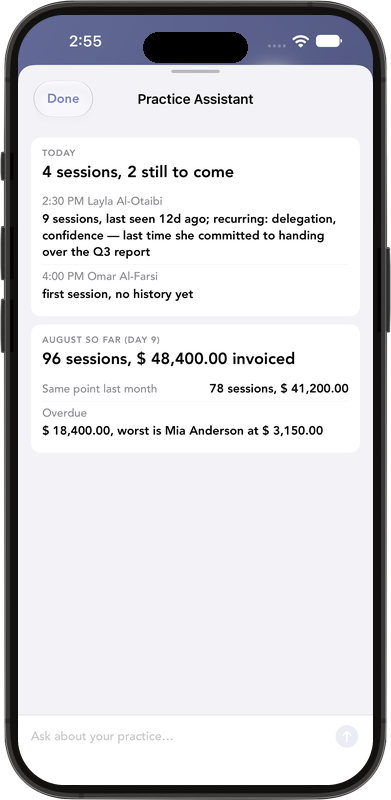
Before a session, the Client Brief sums up the recurring #themes, what the last session covered, how long it has been and what is owed. Ask the Practice Assistant who owes you or what you haven't invoiced; it reads your records and never changes them. Apple Intelligence, on your device or in Apple's Private Cloud Compute, on an Apple Intelligence-capable device.

05 — The business side

What you made

Revenue, Profit, Expenses, Activity, Clients and VAT Export reports, each as a PDF. Log expenses against a client or a workshop, and Scan Receipt fills in the vendor, amount and date. Workshops keep their own notes, appointments, expenses and bill.

06 — iPhone, iPad and Mac

One practice, every screen

The same records on your iPhone, iPad and Mac through your own iCloud, with no account. A one-tap SMS or WhatsApp appointment reminder, an Agreements & Terms PDF with a signature line for new clients, Siri shortcuts and widgets. A practice app for solo coaches

Inside the app

Know the client
before they sit down.

A client's last session, #themes and unbilled sessions. Swipe to tick sessions into a bill, see who still owes you, read the Client Brief, check the year's profit, and open the dashboard with the coming appointments and their Remind buttons.

← Swipe the phone · or use the arrows

A client: upcoming appointment, financial summary, 4 unbilled sessions and the last session's notes with #career and #leadership themes Sessions & Billing: three unbilled sessions ticked, a $1000 total and Create Bill (3 sessions) Clients filtered to Due: what each client has unbilled, billed and still due, with partly paid bills Client Brief before a session: sessions, unbilled, due and advance, then recurring themes and what the last session covered Profit report: profit for each month of 2026 after tax and expenses Dashboard: the year's profit, revenue, paid expenses, unbilled and due, and the coming appointments with Remind buttons
Plans

One flat price.
Never per client.

Free for up to 2 clients. Premium unlocks unlimited clients and workshops, on every device you own.

01 — Free

Try it properly.

Up to 2 clients.

02 — Premium

Your whole practice.

Unlimited clients and workshops, on iPhone, iPad and Mac.

$2.99 / month
$29.99 / year

03 — Lifetime

Pay once.

Everything in Premium, with no renewals.

$79.99
one payment

US prices; local App Store prices vary. Monthly and yearly plans renew until you cancel them in your App Store settings. Lifetime is a one-time purchase.

Guides

Run your
practice.

01

Session notes →

Keep coaching session notes on your iPhone, tag #themes, and see where you left off before the next session.

02

Invoicing →

Turn logged sessions into an invoice, record partial payments and advances, and know who still owes you.

03

Client management →

A practice app for solo coaches on iPhone, iPad and Mac. No account, no client logins, one flat price.

FAQ

Questions,
answered.

More answers on the support page.

What's free, and what does Premium cost?

Free covers up to 2 clients. Premium unlocks unlimited clients and workshops: $2.99 a month or $29.99 a year, or $79.99 once for Lifetime. US prices; local App Store prices vary. Subscriptions renew until you cancel them in your App Store settings, and one purchase covers your iPhone, iPad and Mac.

Can my clients pay or book through Smart Coach?

No. There is no checkout, card payment, payment link or booking page. Your clients pay you the way they already do, and you record each payment against the bill, in full or in part, or as an advance.

Do my clients get a portal or an app?

No. Your clients never log in to anything. You share what they need yourself, as PDFs: invoices, receipts, a session note or the Agreements & Terms document.

Does it remind my clients?

Not on its own: nothing is ever sent to a client automatically. On the dashboard, Remind next to an appointment opens a ready-written reminder you send by SMS or WhatsApp. For unpaid bills, Overdue Payment Alerts (when on) remind you every Monday, and the client's WhatsApp, message and email buttons are one tap away.

Is it HIPAA-compliant, or an EHR?

No. Smart Coach is a private-pay practice app for coaches: no insurance claims, no EHR and no HIPAA claim. Your records stay in the app and your own iCloud, and the rules of your profession remain yours to follow.

Is it available in Arabic or other languages?

Not yet. The app is in English only today.

Do I need an account? Does it work offline? Where is my data?

No account and no login, and it works offline. Your clients, notes and bills are kept in the app and sync between your devices through your own iCloud, which ZaatarLABS cannot access. On iPhone and iPad the app can also share limited usage information in fixed categories (never names, notes, #themes, amounts or anything you type) to help us improve it and measure Apple Ads; you can switch both off in Settings → Privacy. The Client Brief and Practice Assistant use Apple Intelligence, on your device or in Apple's Private Cloud Compute. Details are in the privacy policy.

Does it work on a Mac?

Yes. The same practice is on your iPhone, iPad and Mac, synced through your iCloud. A few things are iPhone or iPad only: the Coaching Day Live Activity, the camera for Scan Receipt (on Mac you pick the receipt photo instead) and the usage settings in Settings → Privacy.

Know where
you left off.

Put your first two clients in tonight. Free for up to 2 clients.